
PSE, Short for Pagos Seguros en Línea (Secure Online Payments), is Colombia’s universal payment platform that connects your bank account directly to merchants, government portals, and service providers. Whether you’re splitting rent with roommates, paying tuition, or settling fines, PSE eliminates the middleman and processes transactions in real time.
In this guide, we’ll walk you through the step-by-step process of registering and making your first PSE transaction, troubleshooting common errors, and maximizing the platform’s features. By the end, you’ll navigate Colombia’s digital payment landscape like a local.
What is PSE?
PSE is Colombia’s official electronic payment system operated by ACH Colombia. It connects your bank or financial institution directly to merchants, government portals, and service providers nationwide. You can link your savings account (cuenta de ahorros), checking account (cuenta corriente), or both, and even add debit or credit cards through your chosen bank.
When you make a payment, PSE redirects you to your bank’s own authentication system—whether that’s a password, security token, or biometric verification—ensuring every transaction meets your bank’s security standards. Instead of juggling multiple payment methods, PSE in Colombia lets you complete all transactions from a single, highly secure platform.
Do I Need a Colombian Bank Account to Use PSE?
Yes, PSE requires a Colombian bank account to process transactions. If you’re bringing funds from abroad in USD, EUR, or other currencies, you’ll need a secure and legally compliant way to transfer that money into the Colombian financial system. This is where a brokerage account becomes essential.
Alianza is a regulated brokerage firm that allows foreigners to receive and convert international funds with full legal transparency. Whether you’re transferring salary payments, pensions, freelance income, or making a foreign direct investment, Alianza ensures your money enters Colombia through proper channels—crucial if you’re working toward an investment visa or business owner visa.
Why Choose Alianza as a Local Bank?
-
Authorized to handle foreign currency transfers for expats.
-
Helps legalize funds for visa applications.
-
Fully regulated by Colombian financial authorities.
-
Seamless integration with local banks for PSE access.
-
Transparent exchange rates and compliance documentation.
Ready to bring your money into Colombia the right way? Click on the link below, and get your broker account set up in as little as one week, with full support for transfers and legal documentation.
OPEN YOUR BROKER ACCOUNT NOW!
- Broker account opening in Colombia (estimated time: 1 week)
- Guidance through the transfer & legalization process
- F4 or F5 forms processing for legal compliance
What is the Step-by-Step to Register in PSE?
Before you can use PSE for payments, you’ll need an active registration on the official portal. The good news? The process is straightforward, even if Spanish isn’t your first language. Below, we’ll walk you through each step using Alianza as our example entity so that you can create your PSE account with confidence.
Step 1: Access the Official PSE Portal
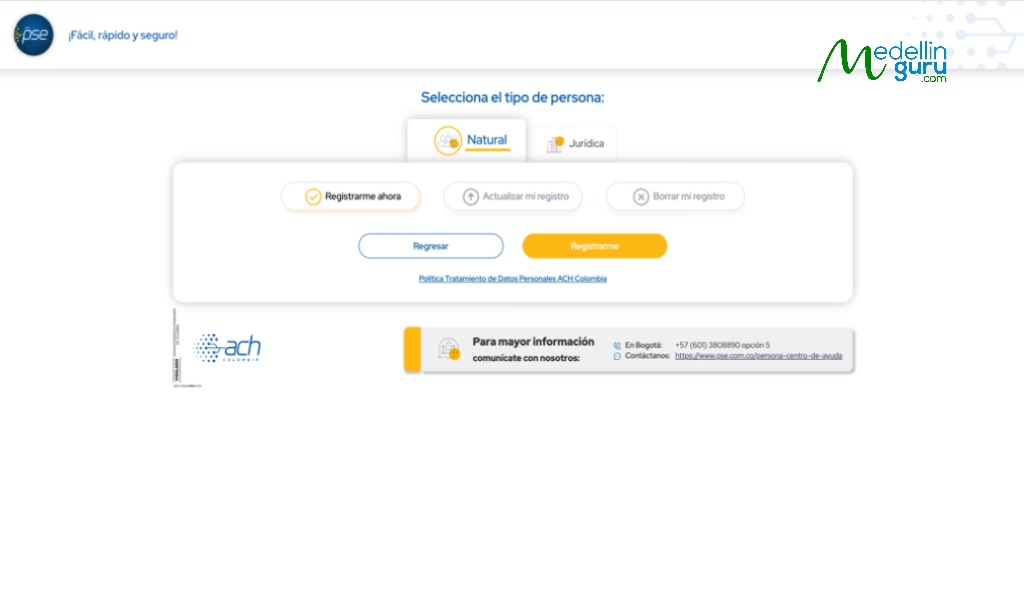
Head to www.pse.com.co and navigate to the Persona Natural (Individual) section and click on Registrarme (Sign up). This is the registration path for personal accounts, not businesses. You can also access the first-time user page directly. The interface is in Spanish, but we’ll guide you through the key fields below.
Step 2: Fill Out the Registration Form as a Foreigner
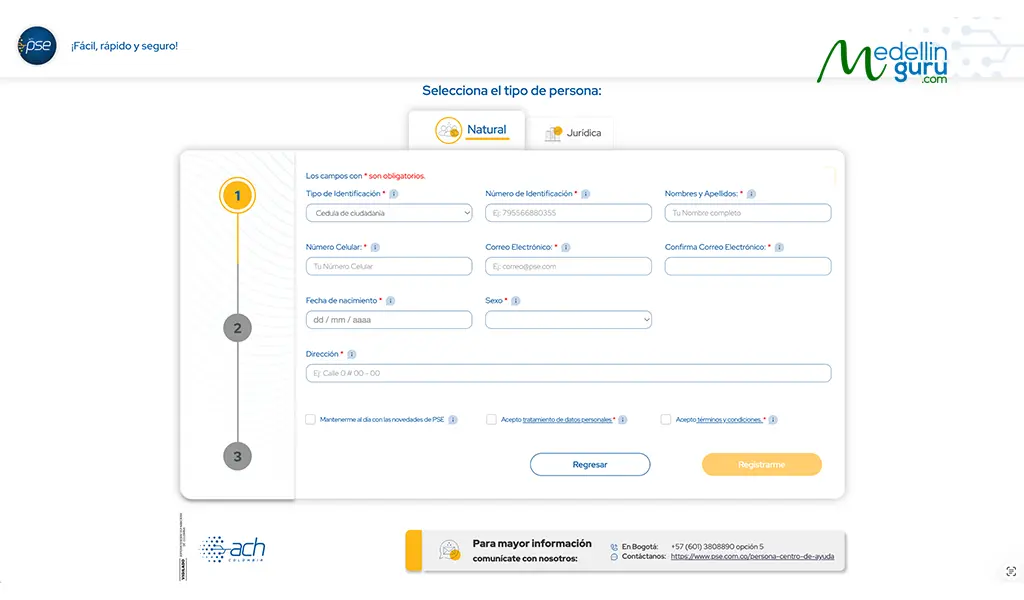
This is simpler than it looks. For Tipo de Documento (Type of document), select Cédula de Extranjería (Foreign ID Card) or Passport. Enter your Número de Documento (ID Number) exactly as it appears on your ID. Your Correo Electrónico (Email Address) is crucial—it functions as your universal PSE access key, so use an email you check regularly. Double-check everything and submit.
Step 3: Verify your account via Email
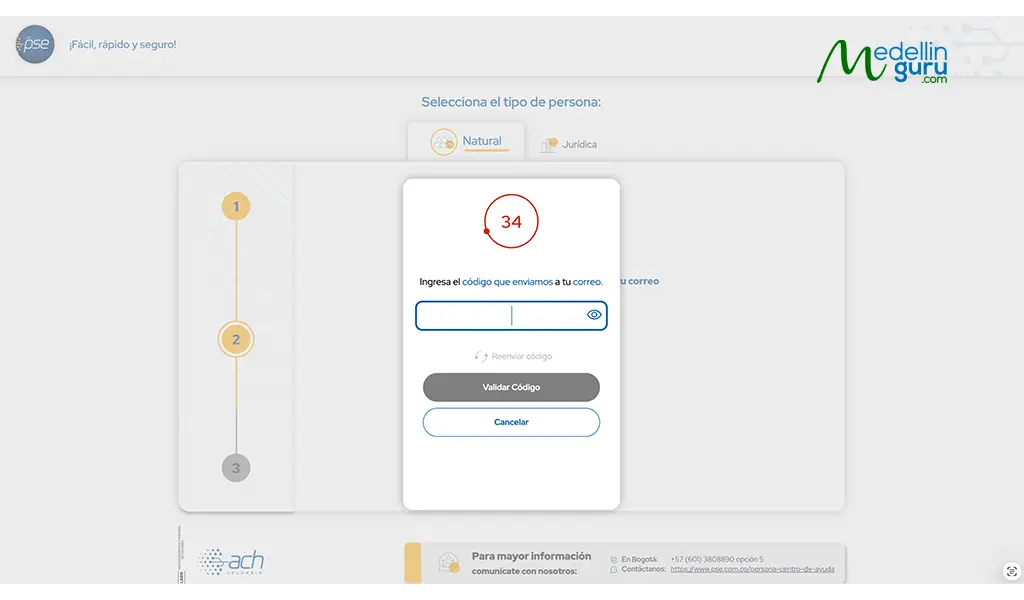
After submitting your information, a pop-up will prompt you to enter a verification code. Check your inbox for an email from “Serviciopse” containing the code—if you don’t see it, check your spam folder. Enter the code, and your PSE account will be ready to use.
What is the Step-by-Step to Use PSE for Payments?
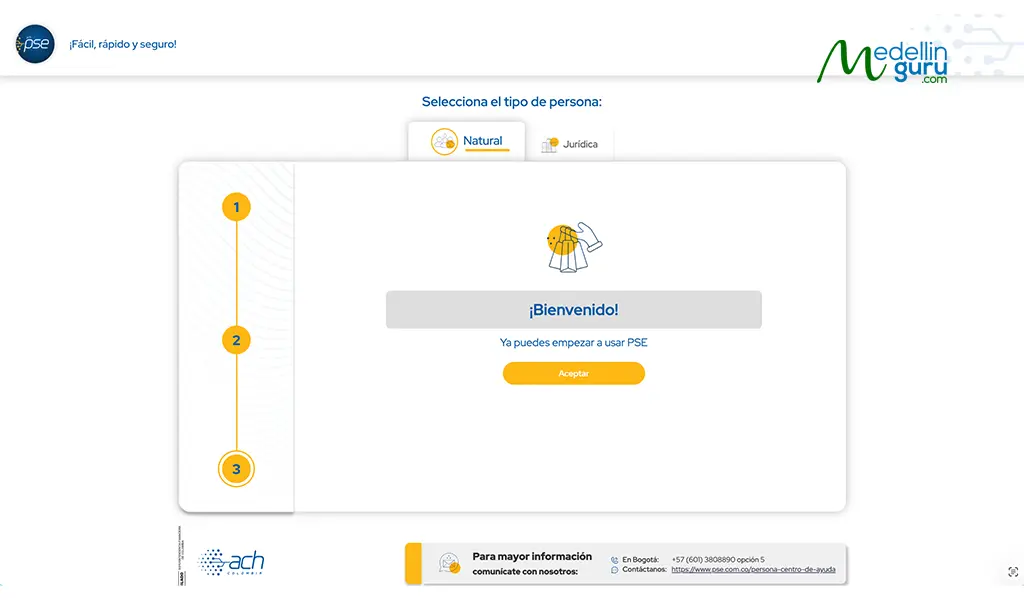
Now that your PSE account is active, you can use it with any merchant, service provider, or government portal that accepts PSE as a payment method across Colombia. For the following step-by-step guide, we’ll use Alianza as our example financial entity to demonstrate how the payment process works from start to finish. Here’s how to complete a transaction in three simple steps.
Step 1: Look for PSE payment method
When you’re ready to pay on a website or platform that accepts PSE, look for it among the available payment options—typically listed under “bank transfer” or “online payment.” Select PSE to proceed, and you’ll be prompted to choose your financial entity in the next step.
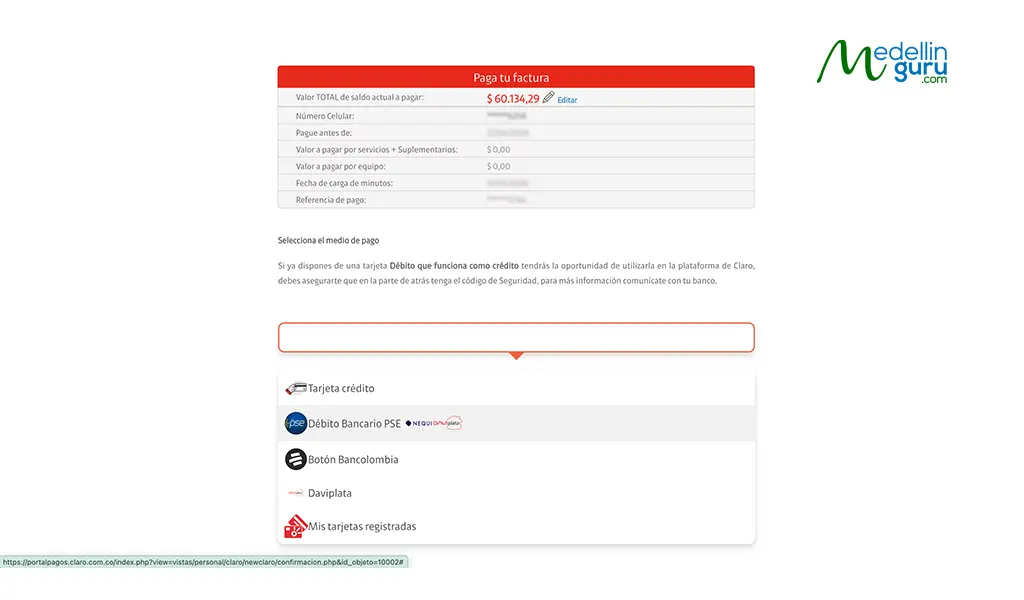
Step 2: Select PSE and Choose Your Financial Entity
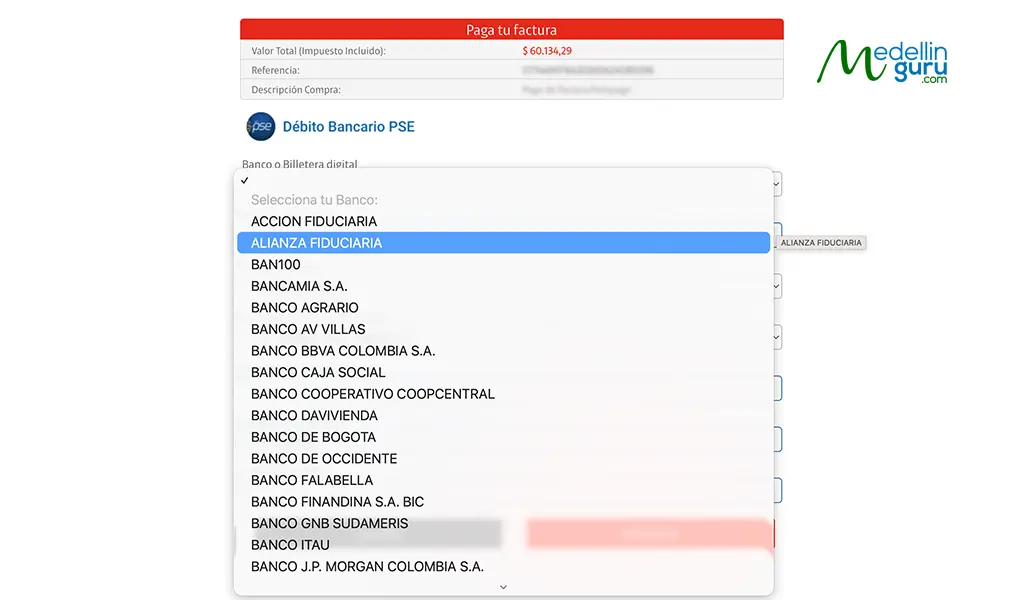
At checkout—whether for utilities, government services, or e-commerce—choose PSE as your payment method. You’ll then see a dropdown menu to select your bank or financial entity. If you’re paying through an Alianza account, search for “Alianza Fiduciaria” and indicate whether you’re using your savings account (cuenta de ahorros) or checking account (cuenta corriente).
Step 3: Authenticate and Confirm
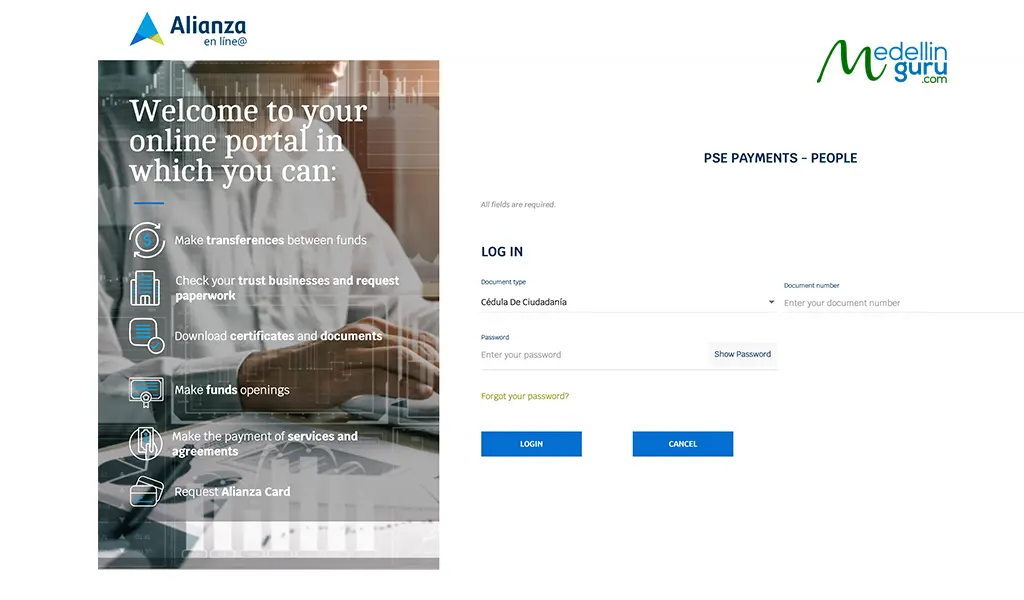
PSE redirects you to your financial entity’s secure portal. Log in using your usual credentials (password, token, or biometrics), review the transaction details, and confirm. Once approved, you’ll be redirected back to the merchant with your payment complete.
What Can I Do With PSE in Colombia?
Here’s where PSE really shines. Once you’re set up, you’ll be surprised at just how many services, businesses, and government entities accept PSE payments across Colombia. From settling utility bills with Vanti, Enel-Codensa, or Acueducto de Bogotá to handling visa renewals through Migración Colombia and taxes via DIAN, the system covers nearly every financial touchpoint in your daily life—all from your phone, no bank lines or Efecty visits required. It also solves a common expat headache: accessing services that reject international cards, like local subscriptions, insurance providers, and government portals.
Below, you’ll find a snapshot of the most common PSE use cases. This isn’t an exhaustive list, as there are hundreds of authorized merchants and portals, but it gives you a clear picture of what’s possible when you pay with PSE.
| Category | Service |
|---|---|
|
Utilities |
Vanti, Enel-Codensa, Acueducto de Bogotá, EPM |
|
Government |
DIAN, Migración Colombia, RUNT |
|
Telecom |
Claro, Movistar, Tigo |
|
Education |
University tuition, ICETEX |
|
Insurance |
SOAT, health policy providers |
|
Transportation |
Transmilenio, Metro Medellín, national tolls |
|
E-commerce |
MercadoLibre, Rappi, Éxito, Falabella |
|
Subscriptions |
Streaming services, coworking spaces |
|
Healthcare |
EPS payments, medical appointments |
|
Housing |
Rent payments, property management fees |
Ready to start using PSE? First, you’ll need a Colombian account that lets you transfer funds from abroad and manage your money securely within the country. Opening one gives you direct access to Colombia’s financial system—no workarounds, no limitations. Here’s how to get started:
Medellin Guru's Comprehensive Business and Taxes Series
At Medellin Guru, we are passionate about Colombia and committed to providing valuable insights for the business community. Our page features a blog series dedicated to business and taxation in Colombia, offering expats essential guidance and pertinent information to navigate the local landscape. Discover our articles on business strategies, tax regulations, and best practices for operating in Colombia here:
- How to File Income Taxes (Declaración de Renta) in Colombia
- How to Start a Business in Colombia as a Foreigner
- How to Legalize Foreign Direct Investment in Colombia
- How to Obtain a Business Visa
- How to Obtain a Colombia Investment Visa
- Investments: Risks of Investing in Real Estate in Colombia
- Santa Marta: The Current Top Choice for Property Investment
- Colombia’s IVA Tax & How Tourists Can Get an IVA Tax Refund
- US Taxes Expat’s Guide: Foreign Financial Reporting -Tax Strategy One
The Bottom Line: How to use the PSE Payment Method as an Expat in Colombia
Navigating finances in a foreign country doesn’t have to be a constant battle. With PSE, you gain access to Colombia’s universal payment infrastructure—the same system locals rely on every day. No more rejected cards, bank lines, or missing out on local-only services.
Here’s what you need to remember:
- Register once on the official PSE portal at www.pse.com.co
- Connect to a foreigner-friendly financial entity like Alianza.
- Setup takes minutes; saves you countless hours of frustration.
What you can do now:
- Pay your Vanti, Enel-Codensa, or ETB bills from your couch
- File taxes with DIAN without visiting an office.
- Handle various Visa Application payments with ease
- Shop freely on MercadoLibre, Rappi, and local stores
Once you’re set up, PSE becomes second nature. Whether you’re paying Vanti or Enel-Codensa bills, filing taxes with DIAN, handling visa renewals through Migración Colombia, or shopping on MercadoLibre—everything flows through one secure system. No more rejected international cards, no Efecty runs, no wasted afternoons at the bank.
Medellin Guru Social media
Be part of our community. Find out about news, participate in events and enjoy the best of the city.